
Messages - SMS Text Messaging
CoreSuite AppsCommunication
4.426.00 Reviews
- Version
- 1.0.22
- Installs
- 100.00K
- Age Rating
- Everyone
Screenshots
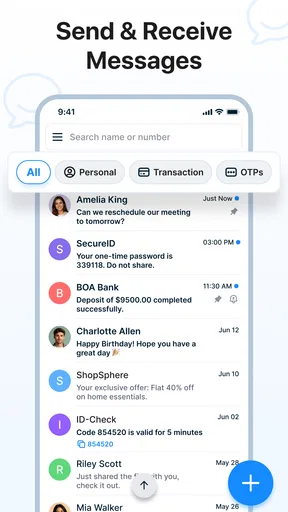
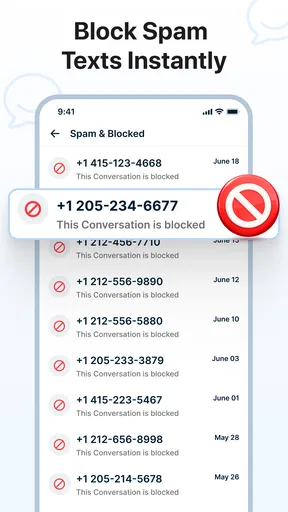
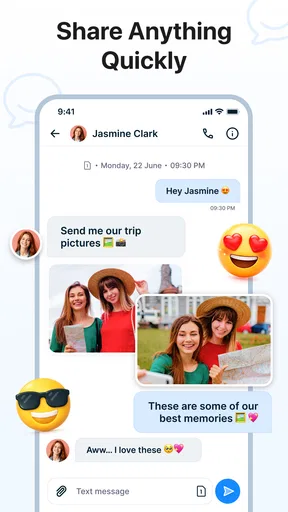
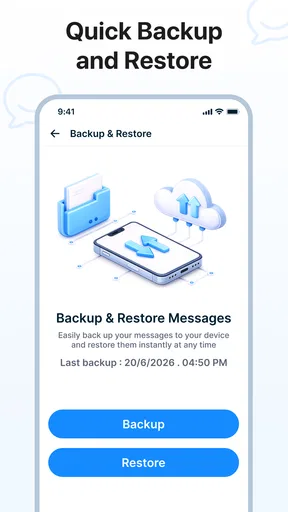
Our Review of Messages - SMS Text Messaging
 Analysis by Appyee
I approached Messages - SMS Text Messaging as a replacement for the ordinary texting app rather than as something I would open for entertainment. That distinction matters. A messaging tool earns its place through small, repeated conveniences: finding a conversation quickly, keeping unwanted messages under control, recovering important threads, and staying out of the way when I am busy. After using it with that standard, I found a practical communication app from CoreSuite Apps that is easy to understand and more feature-minded than the basic SMS tools that come preinstalled on many phones.
Its first impression is straightforward. The app is free, aimed at everyone, and works on Android devices running version 7.0 or later. The current release is 1.0.10, and its public reception is encouraging, with a 4.2 average from around 258 ratings and more than 50,000 installs. Those figures suggest that it has moved beyond being a purely experimental download, although it is still a relatively young choice compared with long-established messaging applications.
What makes it appealing at first
The strongest early appeal is the combination of familiar texting and useful protection tools. I do not have to learn a completely new communication system or persuade friends to install the same service. SMS remains the foundation, while options such as backup, spam blocking, and private chats give the app a more deliberate feel than a bare conversation list.
That makes it particularly useful for people who want more control without moving their everyday conversations to a separate internet-based platform. A family member who uses a different phone, a business contact who only sends text messages, or a service that delivers verification codes can still reach me through the normal mobile network. I can keep those exchanges in the same place while using the app’s extra tools to make the inbox less chaotic.
The private-chat option is one of the more interesting reasons to try it, but I would not treat the label alone as a guarantee of complete privacy. The sensible approach is to use it for conversations that benefit from an additional private space, while avoiding assumptions about security protections that have not been clearly explained. For highly sensitive communication, a dedicated end-to-end encrypted messenger remains the more appropriate choice.
The spam blocker is another feature that can show its value quickly. Text-message spam is often more irritating than dramatic: repeated promotions, suspicious delivery notices, and messages that interrupt a busy day. A blocking tool is most helpful when it quietly reduces those interruptions rather than demanding constant attention. I found that this is a better reason to keep the app than simply wanting a different color scheme or a new conversation layout.
A realistic everyday workflow
Imagine receiving a delivery update while coordinating a school pickup and answering a family message at the same time. In a basic SMS application, the useful conversation can disappear among promotional texts, and an important thread may be difficult to recover after changing phones. With this app, the more sensible workflow is to use the spam controls early, keep genuinely important conversations in the normal inbox, and make a backup routine part of phone maintenance instead of waiting until a device fails.
That workflow reveals an important strength: the app is not only about sending messages. It is also about reducing the small risks around messaging. A backup can matter when a phone is lost, reset, or replaced. A private conversation area can help separate personal exchanges from the general inbox. Spam controls can reduce visual clutter. None of these features makes texting exciting, but together they can make it less tiring.
I also appreciate that the app does not require every contact to join a new network. That is a meaningful advantage over internet messaging services when the people I need to reach are spread across different platforms. The trade-off is that SMS still depends on the limitations of SMS: it is not the same as a modern internet messenger, and the app cannot turn every traditional text into a fully featured chat experience.
Whether it keeps earning space over time
I judge a messaging app’s staying power by whether its safeguards become easy habits rather than chores. Here, a brief backup check and occasional review of filtered messages can help the extra controls remain useful without adding much friction. That routine matters even more for people who depend on texts for appointments, deliveries, or family coordination, and it leads to a broader question: whether the app feels comfortable to use in different situations.
Month-to-month value comes from routine
After the novelty fades, a communication app has to justify itself through repetition. In my view, this one can do that for users who regularly receive unwanted texts or who care about preserving conversations. The backup function is especially valuable when treated as a quiet safety net. It is easy to ignore while everything works, but it becomes important the moment a phone is replaced or a message history disappears.
My practical advice is to establish a simple habit soon after installation: review the backup settings, decide what conversation history matters, and check the process after a major phone change. The feature is useful only if it matches the way I actually manage my device. A backup that is never reviewed can create false confidence, so I would not install the app and immediately assume every message is protected without looking at its controls.
The spam blocker also becomes more useful with time because its benefit is cumulative. One blocked nuisance is minor; a quieter inbox over many weeks is much more noticeable. I would use it selectively rather than aggressively. Legitimate automated messages can resemble spam, especially delivery alerts, appointment reminders, or one-time codes. A quick review of blocked items is therefore a worthwhile habit before relying on the filter completely.
Private chats have a similar long-term question. They are valuable when I consistently use them for the conversations that need separation, but they add little if I forget where a thread was placed. The feature rewards a clear personal rule, such as keeping sensitive personal discussions there while leaving ordinary logistics in the standard inbox. Without that rule, the extra privacy space can become another place to search.
These details are why I see the app as a maintenance-oriented tool. Its recurring value is not based on constant novelty. It comes from keeping the inbox manageable and preserving access to useful conversations. That is a good fit for someone who wants their messaging app to behave like dependable household software: installed once, adjusted carefully, and checked occasionally.
What can create fatigue
The first possible source of fatigue is having another app involved in a task that already feels simple. Many phones include a default SMS application, and that default option has a major advantage: it is already there, familiar, and usually connected to the phone’s messaging workflow. Switching only makes sense if the additional controls genuinely solve a problem I have.
There is also a mental cost to managing more than one message location. If I use ordinary chats, private chats, and blocked-message review without a consistent system, I can spend more time looking for a conversation than I would in a simpler app. The solution is not complicated, but it requires discipline. I would keep the general inbox for routine messages, reserve private chats for a clearly defined purpose, and check filtered content when an expected message does not arrive.
Backup can create fatigue too, particularly for people who want everything to happen automatically and never want to think about storage or recovery. The feature is reassuring, but it still deserves an occasional check. A messaging app should reduce anxiety, not replace it with uncertainty about whether an old conversation was actually saved. Users who dislike any form of device maintenance may prefer a simpler default tool or a cloud-centered messenger with a recovery process they already understand.
Spam protection can also be imperfect in ordinary use. A filter must balance unwanted messages against legitimate automated communication, and that balance will not be identical for every person. Someone who relies heavily on service alerts may need to inspect filtered messages more often. Someone who receives constant promotional texts may accept a more aggressive approach. The important trade-off is convenience versus visibility: fewer interruptions can mean more checking when something expected seems missing.
The private-chat feature may cause a different kind of fatigue for households that share devices or for users who need their conversations to be instantly discoverable. Extra separation is helpful when privacy is the priority, but it is less convenient when speed and transparency matter more. I would not choose this app solely for that feature unless I was comfortable making it part of my everyday messaging routine.
How it compares with familiar alternatives
Compared with the phone’s standard SMS application, this app offers a more intentional set of tools around the inbox. The default option is usually better for people who want the fewest decisions and are satisfied with basic texting. Messages - SMS Text Messaging is more attractive when spam control, backup, or private organization addresses a real annoyance.
Compared with internet-based messengers, it has the advantage of reaching people through traditional texting without requiring a shared service. That makes it practical for mixed contact lists. The downside is that it should not be judged as a full replacement for every modern chat platform. People who depend on rich group conversations, media-heavy exchanges, synchronized desktop messaging, or advanced encrypted communication may be better served by a dedicated internet messenger.
It also occupies a middle ground between a minimal utility and a privacy-focused communications tool. The private-chat feature gives it more range than a plain SMS client, but I would still choose a specialist security messenger for conversations where verified end-to-end protection is essential. That is not a criticism of its everyday usefulness; it is simply the right boundary for the product.
Who should install it, and who should skip it
I would recommend it to someone who sends and receives ordinary text messages every day, is frustrated by promotional texts, and wants a backup option without abandoning SMS. It is also a reasonable fit for users who like separating certain conversations from the main inbox and are willing to spend a few minutes setting up a consistent workflow.
I would be more cautious about recommending it to someone whose default messaging app already handles their needs perfectly. If the inbox is quiet, message history is already protected, and there is no interest in private organization, switching may add complexity without delivering a meaningful improvement.
I would also point heavy multimedia users toward a richer internet messaging service. This app makes the most sense when traditional texting is still central. Likewise, anyone choosing primarily for advanced privacy should investigate a purpose-built secure messenger rather than assuming that a private-chat label answers every security question.
My long-term verdict
After the initial curiosity wears off, Messages - SMS Text Messaging earns lasting space mainly through practical maintenance features rather than flashy presentation. Its best qualities are the ones I notice indirectly: fewer unwanted interruptions, a better chance of recovering useful conversations, and a way to keep selected chats apart from the general inbox.
Its limitations are equally practical. It can introduce another layer of organization, the spam filter deserves occasional checking, and its private-chat option should not be confused with a complete answer for high-security communication. Users who want a completely hands-off experience may find the default SMS app less demanding.
For me, the deciding question is simple: do backup and spam control solve recurring problems? If the answer is yes, the free price and broad Everyone rating make it easy to try, and the app has enough everyday value to remain installed. If the answer is no, there is little reason to replace a familiar texting tool merely for the sake of change. Its strongest case is dependable inbox management, not novelty.
CoreSuite Apps has built a communication app that fits a specific need: making conventional SMS feel more manageable without requiring contacts to move elsewhere. I would keep it on a phone where unwanted texts, message recovery, and selective privacy are genuine concerns. I would skip it on a device where simplicity already wins. That balance is what gives it a credible long-term role rather than just a promising first week.
Privacy and Permissions
See what permissions an app requests and how it handles your data.
- Contacts
- read your contacts
- Location
- approximate location (network-based), precise location (GPS and network-based)
- SMS
- read your text messages (SMS or MMS), receive text messages (SMS), send SMS messages, edit your text messages (SMS or MMS)
- Phone
- directly call phone numbers, read call log, read phone status and identity
- Photos/Media/Files
- read the contents of your USB storage, modify or delete the contents of your USB storage
- Storage
- read the contents of your USB storage, modify or delete the contents of your USB storage
- Wi-Fi connection information
- view Wi-Fi connections
- Device ID & call information
- read phone status and identity
- Other
- view network connections, connect and disconnect from Wi-Fi, full network access, run at startup, reorder running apps, draw over other apps, control vibration, prevent device from sleeping, Google Play license check
Verdict
Strengths of Messages - SMS Text Messaging
- Simple interface makes texting quick and easy.
- Supports group conversations for staying in touch with several people.
- Conversation history is easy to browse and search.
- Works without requiring a separate social media account.
- Useful notification controls help manage incoming messages.
Limitations of Messages - SMS Text Messaging
- Some features depend on your carrier and device support.
- Spam messages may still reach your inbox without extra filtering.
- Media sharing can use mobile data quickly.
- Advanced chat features may be limited compared with modern messaging apps.
- Restoring old conversations may require device or account backups.
Similar Picks in This Category
View All
Google Messages
Google LLC4.6

Gmail
Google LLC4.1

Google Meet
Google LLC4.4

Google Chrome
Google LLC4.1

WhatsApp Messenger
WhatsApp LLC4.6

Carrier Services
Google LLC4.2
Frequently Asked Questions
What is Messages - SMS Text Messaging used for?
Messages - SMS Text Messaging is designed for sending and receiving traditional text messages through your mobile carrier. Depending on the device and version, it may also support multimedia messages, group conversations, emojis, contact sharing, and message notifications. It is mainly intended for communication using your phone number, so standard carrier messaging charges or plan limits may apply.
Does Messages - SMS Text Messaging require an internet connection?
A constant internet connection is generally not required for standard SMS messages because they are delivered through your mobile network. However, an active cellular signal and a valid messaging plan are necessary. Features such as picture messages, group messages, app updates, cloud backups, or any internet-based options may require mobile data or Wi-Fi, depending on your phone and carrier settings.
Can I send photos, videos, or group messages with this app?
The app may support multimedia messages and group conversations, but availability can depend on your Android or iOS device, carrier, messaging plan, and regional settings. Sending photos or videos usually uses MMS or another enhanced messaging service, which may require mobile data. Large files can also take longer to send and may be limited by your carrier.
Are my messages private and secure when using Messages - SMS Text Messaging?
Standard SMS and MMS messages are normally handled by your mobile carrier and should not be considered end-to-end encrypted by default. The app may protect access through your device lock or operating-system security, but that is different from message encryption during transmission. Avoid sending highly sensitive information unless you understand the privacy and security features available on your device.
Will I lose my conversations if I install, uninstall, or change phones?
Your existing conversations are usually stored locally on the device unless your operating system, manufacturer, or carrier provides a backup and restore option. Uninstalling the app, resetting the phone, or moving to a new device may remove access to locally stored messages. Before making changes, check your phone’s backup settings and confirm whether your SMS and MMS history is included.
